

6 min to read
The Evolution of CakeMail: From Google Sheets to People API

🧠 It All Started with a Sheet…
Back in 2019, I was learning Google Apps Script — and I wanted to build something actually useful. Something that would keep running quietly in the background and make someone smile.
So I made CakeMail — a tiny script that read names and birthdays from a Google Sheet and sent them an email on their special day.
No fancy UI. No database. Just a script, a sheet, and a sprinkle of automation magic.
📅 From Sheets to Bots — The CakeMail Timeline
Over the years, the project slowly grew with me.
🐣 v1 (2019): The Basic Cake
- 📄 Google Sheets as the database
- 🧾 Google Docs for email templates
- 📧 Sent plain emails on birthday mornings
It worked. Kinda. The emails looked… like they came from 2010, but it was a start.
🧁 v2 (2020): Some Frosting
- ✨ Added HTML email templates
- 📊 Basic open tracking
- ✅ Status updates in the Sheet
Now the emails actually looked like they belonged in the current decade. Open tracking was janky, but fun to build.
🎉 v3 (2023): Smarter and Social
- 🤝 Integrated with Google Contacts
- 💬 Sent WhatsApp reminders (because… why not?)
- 📂 Added support for multiple templates
This version started feeling more like a real product. I even used it for close friends and family.
🔄 v4 (2025): Time to Grow Up
Then… Google deprecated ContactsApp.
When I reopened the code this year, it was full of strikethroughs — a graveyard of outdated methods. So I did what any dev with coffee and free time on a Sunday would do: rewrite the whole thing using the Google People API.
🚀 What’s New in v4?
- 🔄 Migrated to Google People API
- 💬 Telegram bot integration for real-time updates
- 📬 Clean, mobile-friendly email templates
- 🔐 Secure credential handling using
PropertiesService - 🧾 Birthday wish status gets saved as a note on the contact
And yes, the open tracking still works. Now it tells me when the birthday email is opened — so I can pretend I totally didn’t forget.
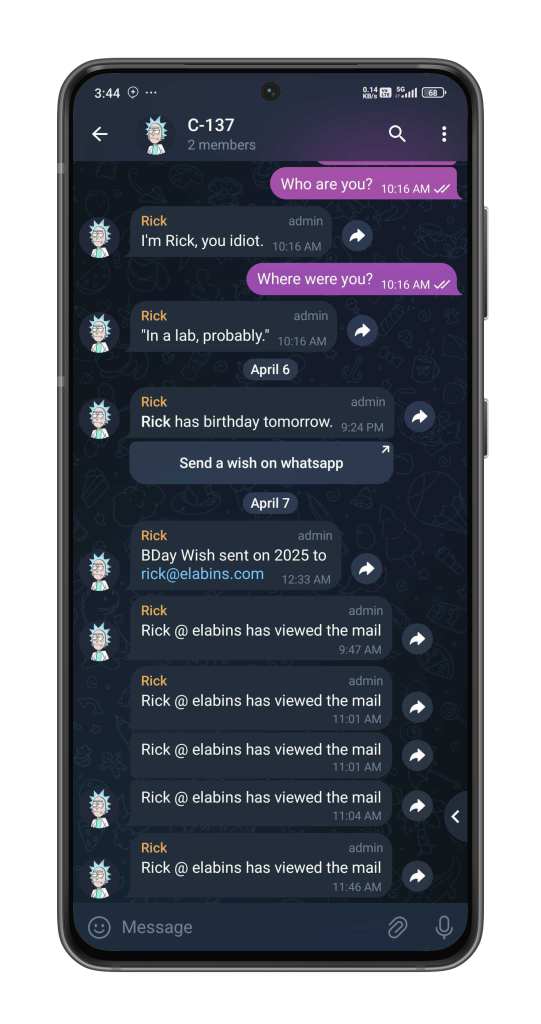
🤖 Why Telegram?
I wanted a simple, no-friction way to get notified. Telegram is fast, has a great bot API, and I was already using it for a bunch of personal tools.
Now, every time an email is sent (or opened), I get a friendly ping from my bot — along with any upcoming birthdays for the next day.
🔧 Technical Notes (for Nerds Like Me)
- Written entirely in Google Apps Script
- Uses OAuth2 for Google People API access
- Stores config data securely with
PropertiesService - Templates are written in plain HTML with inline CSS
- Telegram bot is just a simple webhook POST using
UrlFetchApp - Email tracking uses a sneaky 1×1 image + open-logging


🧠 Things I Learned (Or Relearned)
- APIs get deprecated. Always.
- Modular code = easier migrations.
- Don’t overbuild. Start tiny, then grow slowly.
- Even silly little side projects can teach you a LOT over time.
- Personal automation is extremely satisfying.
🛣️ What’s Next?
No promises, but I might:
- 🧠 Add AI-powered personalized birthday wishes (GPT + templates)
- 📈 Build a tiny analytics dashboard
- 🛠️ Let users edit templates from a front-end UI
- 📨 Add support for other platforms like Signal or Discord
Repo
Let’s see how far CakeMail wants to go before retiring.
💬 Final Thoughts
CakeMail isn’t a startup. It’s not “enterprise-ready.” It’s not even meant for public release (though you’re welcome to fork it on GitHub).
It’s just a little automation script that grew with me — from a Sheets script to a bot-powered notifier that still makes someone’s birthday a little nicer.
And that feels like a win to me.
Thanks for reading! Got any old projects you’ve revived recently? I’d love to hear about them.


Good
Awesome
Very good